
For most local service businesses, the Google Business Profile brings in more calls than the website. The good news for agencies: almost everything that matters on a profile is public, so you can audit it before you ever speak to the owner.
How to start a profile audit
- Open AAM SEO Checker and switch the top bar from Website to Google profile.
- Paste the profile's link (a Google Maps link, a
share.googlelink or ag.pagelink all work), or type the business name and town. - Press Audit profile. If several businesses match the name, pick the right one from the list.
The extension reads the public profile on Google Maps and Google Search, checks that the website it links to actually loads, and then compares the business with the top three on Google Maps for its main search. A progress bar shows each step; a small Google window works in the corner of your screen and closes by itself.
What to check on a Google Business Profile
1. Primary category
The primary category is one of the strongest relevance signals a profile has. A plumber listed under "Contractor", or a roofer under "Construction company", is fighting with one hand tied. Compare it with the categories of the businesses ranking above it.
2. Business name
The name should be the real business name. Google's guidelines don't allow adding extra information such as services, slogans or locations to the name (Google's guidelines). If competitors are stuffing keywords into their names, that's worth noting, but it isn't something to copy.
3. Reviews: count, rating and recency
Look at more than the star rating. How many reviews does the business have compared with the businesses that rank above it? When did the most recent one arrive? A profile with 40 reviews, the newest from eight months ago, looks quieter to customers than one with 25 reviews from the last two months.
4. Owner replies
Google lists replying to reviews among its own tips for local ranking (Google Business Profile Help). Unanswered reviews, above all negative ones, are also what future customers read. The audit counts how many recent reviews have a reply.
5. Photos
Real photos of the team, vans and finished jobs help a profile stand out. A handful of stock images uploaded years ago is a quick win.
6. Posts (Updates)
Posts show the business is active. The audit reads the posts shown in Google Search and tells you whether there's anything recent, only old updates, or nothing at all.
7. Services, shown as Products
On the public profile, a service business's services appear under Products. Each one gives Google and customers another way to match the profile to a specific job ("water heater installation", "drain cleaning"). Many profiles have none.
8. Description, hours and areas served
The "From the business" description, complete opening hours (including special hours) and the list of areas served all fill in what customers check before calling.
9. The website link
Check that the website button goes somewhere useful. Common problems: no website at all, a link to a Facebook page, a link to an old Google business.site page that Google shut down, or a website that no longer loads. AAM SEO Checker tests the link and reports a dead website as a critical issue, because every customer who taps it hits an error page.
Reading the results
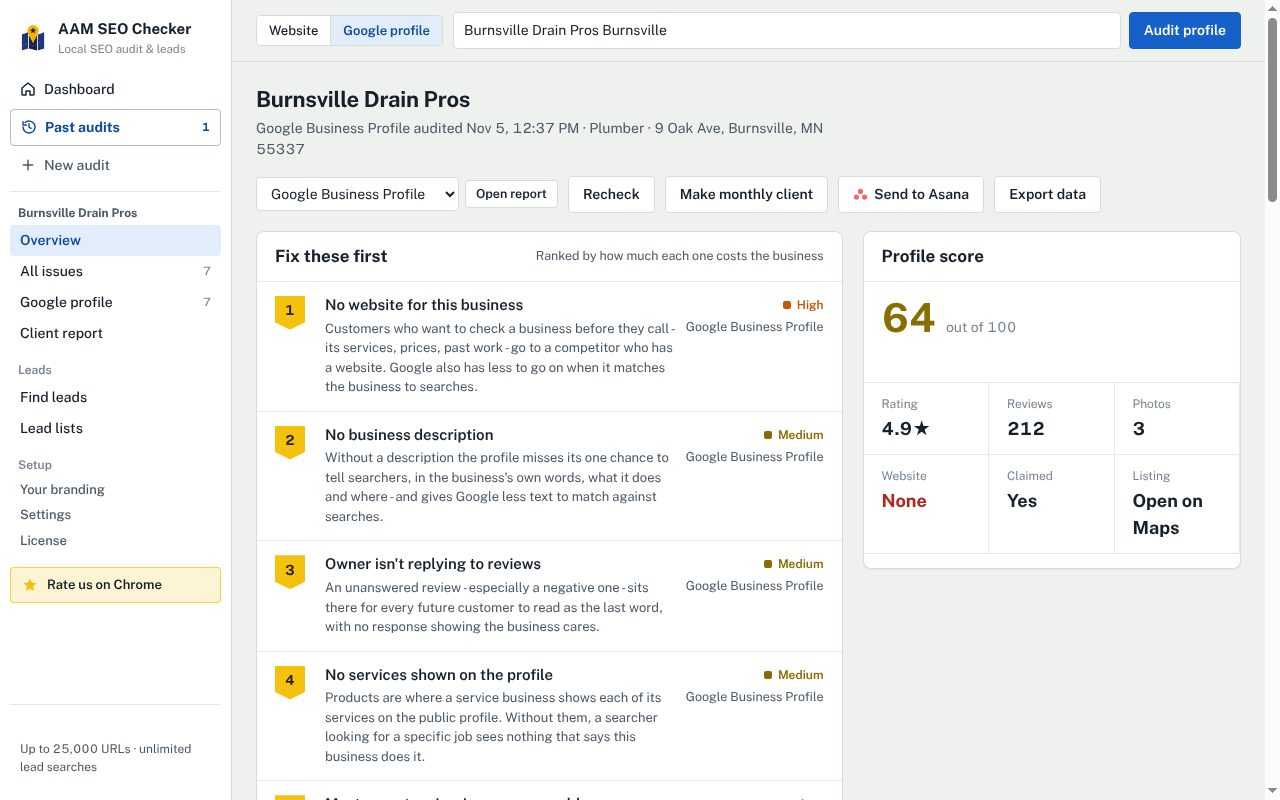
Each issue comes with what it costs the business and a fix written as an action. Review-related fixes include a link to our free Google review link and QR code generator, so the owner can start asking for reviews the same day.
The comparison with the top three on Google Maps is where profile audits become persuasive. Why competitors rank above your client on Google Maps explains how to read it.
When the business has no website (or no profile)
A profile audit works on its own, so you can audit businesses that only have a Google profile. If the profile links to a website, the overview offers to audit that too. The reverse also works: a website audit looks for the business's profile, and if there isn't one, lists that as an issue.
Google Business Profile checklist
- Profile claimed and verified
- The most specific primary category, matching what the top three use
- Real business name, nothing added
- Review count close to the businesses ranking above
- New reviews in the last month or two
- Owner replies to reviews, especially negative ones
- Recent real photos
- A post in the last month
- Main services listed as Products
- Description, full hours and areas served filled in
- Website link that loads and goes to a real website
Questions
Can I audit a Google Business Profile I don't manage?+
Yes. Everything the audit checks is visible on the public profile, so you don't need owner or manager access.
Why does the audit open a small Google window?+
Chrome pauses pages that are hidden or minimised, so the extension reads Google Maps and Search in a small window in the corner of the screen. It closes by itself when it's done.
Does a profile audit count towards the free plan?+
Yes, it counts as one of the free plan's audits for the month.