
Cold outreach to local businesses works when the message is specific: "your phone number can't be tapped on mobile" gets replies, "I can improve your SEO" doesn't. The hard part is finding businesses that genuinely need what you sell, quickly enough to make it worth your time.
Step 1: Pick one trade and one area
Prospect one trade in one area at a time: "plumbers in Burnsville", "roofers in Lakeville". You'll learn what the strong businesses in that market look like, your outreach gets sharper, and your audits double as case studies for the next business in the same trade.
Step 2: Build the list
In AAM SEO Checker, open Find leads:
- Type the type of business and the town.
- Choose how many businesses to save, and give the list a name.
- Choose the purpose of the list: what you want to sell (Local SEO / Google profile, a new website, content, on-page, technical SEO, speed, or full SEO).
- Press Search Google Maps and leave the Google Maps tab alone until it closes.
The extension saves the businesses you'd see in that Google Maps search as a lead list: name, rating, review count, website and phone. Use it at a human pace, the way you'd search by hand; if Google shows a captcha, solve it and search again.
Step 3: Keep the ones that need your service
The purpose decides who stays on the list. After the search, each business's website gets a quick check, and only those with that kind of problem are kept, best first, with the reasons saved on each lead. For example:
- Local SEO / Google profile: few or no reviews, a low rating, an unclaimed profile, no town pages, no local schema or tap-to-call.
- New website: no website, a Facebook page instead of a site, not mobile-friendly, no HTTPS, an outdated or broken site.
- Content: a thin homepage, few service pages, no town pages, no blog.
Step 4: Call the A-tier first
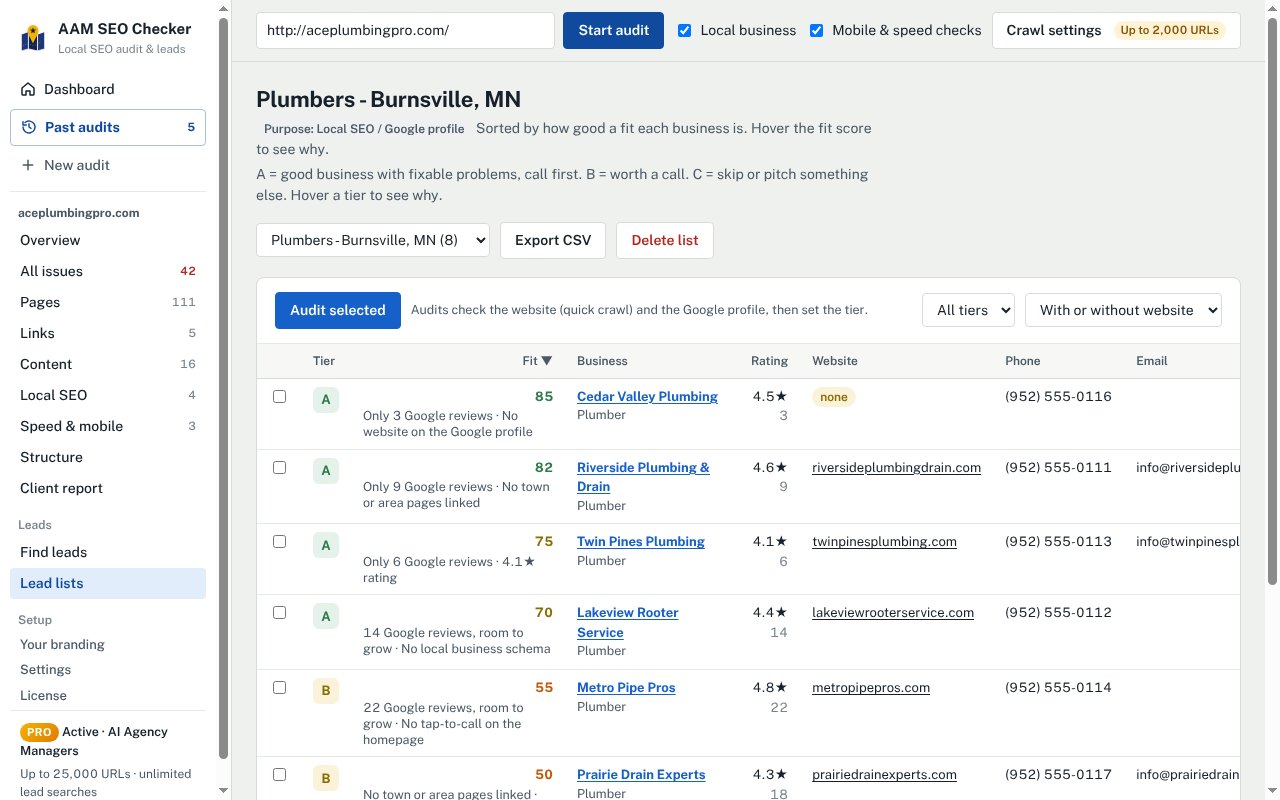
Every lead gets a fit score and a tier with its reason:
- A: a good business with fixable problems. Call first.
- B: worth a call.
- C: skip, or pitch something else.
The best leads aren't the businesses in the worst shape. A plumber with a 4.8 rating and 90 reviews but no website, or a slow site with no town pages, can afford your help and will see results quickly. A business that looks closed or has a 2-star rating is a hard sell whatever you offer.
Step 5: Audit before you reach out
Select your A-tier leads and press Audit selected. Each audit gives you the one or two findings that make a message specific, and a branded report you can attach or offer. See how to do a local SEO audit and how to audit a Google Business Profile for what to look for.
Step 6: Reach out with one finding
Keep the first message short, about them, and easy to answer:
Hi, I was looking at plumbers in Burnsville and noticed Cedar Valley Plumbing has great reviews (4.5 stars) but no website on your Google profile, so people who want to check you out before calling have nowhere to go. I put together a short report on what that's costing you and what I'd fix first. Want me to send it over?
- One finding, in their terms (calls, customers), not jargon.
- Offer the report rather than attaching it to a first cold email.
- Call A-tier leads if you can; a phone call with a specific finding stands out.
- Follow the rules for commercial email where you and they are, and stop when someone asks you to.
Step 7: Track the pipeline
Mark leads as contacted, replied, meeting and won as you go. The dashboard shows the pipeline and an A-tier "call these first" list, so prospecting becomes a short daily habit rather than a big monthly push.
Questions
How many leads can I find on the free plan?+
One lead search a day with up to 10 businesses, and fit scores for the best 3 in each list. Pro allows unlimited searches of up to 120 businesses, with fit scores and reasons for every lead.
Is the data sent anywhere?+
No. Lead lists, audits and reports are stored in your own browser. AAM SEO Checker has no server holding your data.
Can I export the leads?+
Pro can export lead lists to CSV for your CRM or spreadsheet.